Posts

Showing posts with the label problem

Fix MYOB Required Administrator Account in Server 2008

Image
If your company use MYOB as their accounting system and you work in multi user Windows Server environment, probably you have this problem where MYOB always ask for administrator account to run whereas the accountant only given access as a normal user. In this case, I use MYOB version 19 and Microsoft Windows 2008. To solve this problem, you just need to do some little tweak: Make sure that the user have access to the folder where you install MYOB, to do that, go to the installed folder, right click, properties, go to security tab and add the user Open the folder where you installed your MYOB, find myob.manifest and then right click, choose open with notepad Change requestedExecutionLevel from: Highest Available to asInvoker as shown below. Save it, and re run MYOB. It should shut the UAC up :) This also a fix for someone that use several user account under Microsoft Windows 7/Vista.
Black screen on Chrome Browser when using Google Maps

Image
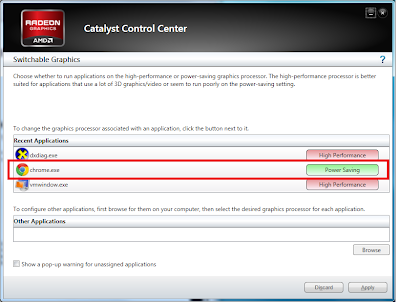
It happened when I tried to enable openGL (beta) when opening Google maps in Google Chrome from my work laptop.  I was using this openGL new feature from Google since last month in Firefox and Chrome from my home laptop and they were running pretty well. But for some reason, when I tried to enable it in my work laptop, the Google Chrome just showed a dark black page. There is nothing I can do because the screen is black. Tried to reset cookies and reset all settings back to default in Chrome with no avail. Solution 1 (If you still want to use OpenGL)  I then realized this laptop like some of new laptops have a hybrid display setting (my laptop is Dell Vostro 3550 with ATI Radeon Graphic Card) . Because I use  Google Chrome pretty often, that's why I set it to use the ATI Radeon instead of power saving Intel Graphic Card. So I turned the graphic option back to Intel (power saving), restart the browser and viola.. The maps show itself well. Interesting fact that ...

Windows 7 Setup Stuck on Completing Installation

Image
Have you ever install Windows 7 and wait for so long loooooooooooooooooooooooong on completing the installation? I did ~.~ just today when I have to work on Saturday T__T Tried to reinstall twice, with no luck, still stuck in the same place. But then I realized, from my previous experience, sometimes when you have USB device plugged into the computer, when booting the computer, Windows will have something like looping problems. For example, last time my windows crash, and then when I tried to restore the installation with my external drive attached, it is stuck on restoring for hours. In my case today, I realized I installed the windows from my external CD-Rom. It is because I re-installed Asus EEE PC in my work place which does not have CD-Rom by default.  So what I did: Do clean installation (for the third time) Wait until the setup finalized copying installation files, expanding the files, and installing the features.  Windows setup will give you fi...

Microsoft Bus Driver Should be Loaded Before Installing

It was very annoying >. I knew that the problem is that Microsoft UAA driver is not installed yet. But even I already tried to install the driver, still I can not get rid of that message. After several minutes frustating moment, finally ^^ I realized what was wrong with my installation. It was because I installed my friend's laptop with black edition XP!! This edition is the reduced XP to make it slimmer and faster. This version is very good for several people, but it also became boomerang for others (like me). Then I tried to install my friend laptop with the original XP disc that came with it. The XP original CD installation took longer time than slim version XP. Also I have to update Windows SP3 manually, but it was worthed ^^ After the installation, I installed the chipset first to avoid anything wrong and then install the audio driver. It went very smooth, I even can not trust my own eyes >. So the bottomline is, if you have the same problem, do not use slim version Win...